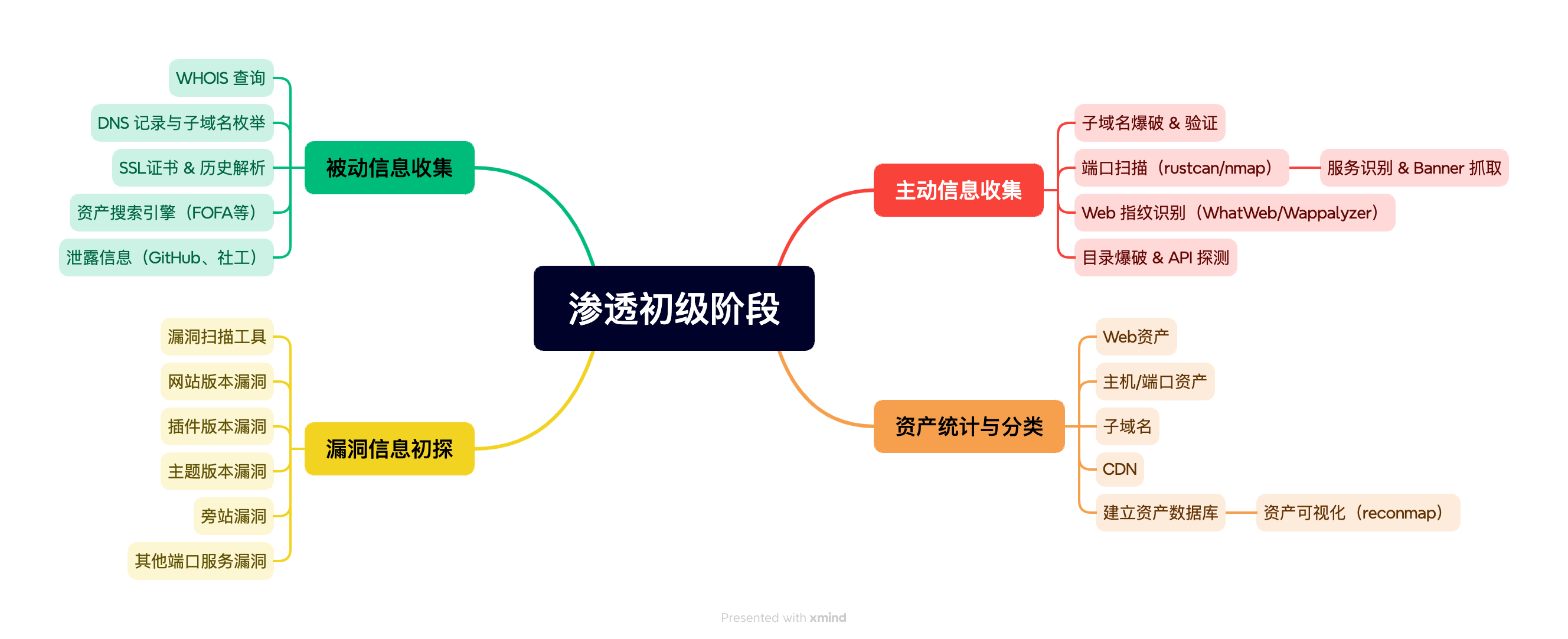
信息搜集流程
被动信息搜集
whois 查询
- 查询域名注册人、邮箱、注册商、历史信息
DNS 信息收集
- 子域名、CNAME、MX 记录
- 历史解析记录
资产关联查询
- 通过注册邮箱、备案号、ICP、WHOIS 反查
- 工具:
- FOFA、Quake、Hunter、ZoomEye
- GitHub 搜索泄露信息
- Shodan 资产搜索
- theHarvester(邮件/子域名收集)
网络空间搜索
查找开放端口、服务、Web应用、组件
工具:
FOFA 查询语法:
1
2
3
4
domain="target.com"
title="xxx"
header="Apache"
cert="*.target.com"
主动信息搜集
子域名爆破/解析
- 工具:
- ffuf
- gobuster
- OneForAll
- 工具:
端口与服务识别
- 对收集到的 IP/域名进行端口扫描
- 工具
- nmap
- rustscan
Web指纹识别
- 识别 CMS、框架、WAF、JS库
- 工具:
- WhatWeb、Wappalyzer、GoUnder(自己编写)
目录与接口爆破
- 探测隐藏页面、后台路径、API接口
- 工具:
- dirsearch、feroxbuster、ffuf
- API文档推测或Swagger探测
服务识别与漏洞资产标注
- 对服务版本进行漏洞匹配
- CMS版本
- 插件版本
- Theme版本
- 端口开放服务版本
- 对服务版本进行漏洞匹配
资产梳理与统计
分类统计
- Web资产(IP + Port + Title + 组件)
- 主机资产(公网/内网 IP)
- 开放端口/服务
- 子域名、主域名资产
- CDN / 非CDN 区分
建立资产数据库
结构
1
2
3
4
5
6
7
8
9
10
11
12
13
14
15
16
17
18
{
"domain": "target.com",
"subdomains": [...],
"ips": [...],
"cdn": [...],
"web": [
{
"url": "https://sub.target.com",
"title": "Login Page",
"tech": ["PHP", "Apache"],
"port": 443,
"status_code": 200
}
],
"services": [
{"ip": "...", "port": 22, "service": "OpenSSH 7.4", "vulns": ["CVE-xxxx-xxxx"]}
]
}
资产可视化
- reconmap(开源信息收集平台)
各类工具用法及作用
nmap
用法
1
2
# 全端口扫描 + 服务识别
nmap -sS -Pn -p- -T4 -sV target.com
rustscan
rustscan 用于识别开放的端口以及服务类型
用法
1
rustscan -a 192.168.0.1 -b 10000 -r 1-65535 -- -sCV > 192.168.0.1.log &
安装
1
2
3
4
5
6
# custom install
https://github.com/RustScan/RustScan/releases
# mac
brew install rustscan
# docker
docker run -it --rm --name rustscan rustscan/rustscan:2.1.1 <rustscan arguments here>
ffuf
ffuf 用于FUZZ,可以用于模糊搜索子域名,目录,GET/POST 参数
用法
1
2
3
ffuf -u <http://topology.htb> -w wordlist.txt -H "Host: FUZZ.topology.htb" -mc 200
ffuf -w /path/to/postdata.txt -X POST -d "username=admin\\&password=FUZZ" -u <https://target/login.php> -mc 200安装
1
2
3
4
5
6
# custom install
https://github.com/ffuf/ffuf
# mac
brew install ffuf
# go
go install github.com/ffuf/ffuf/v2@latest
dirsearch
dirsearch 用于扫描网站目录结构
- 用法
dirsearch -u http://example.com/
- 安装
pip install dirsearch
gobuster
用法
1
2
3
4
5
6
7
8
# dns
gobuster dns -d solarlab.htb -w=/Users/r3tr0/hack/KaliLists/SecLists-master/Discovery/DNS/subdomains-top1million-5000.txt --wildcard
# vhost
gobuster vhost -u http://whiterabbit.htb/ --append-domain -w=/Users/r3tr0/hack/KaliLists/SecLists-master/Discovery/DNS/subdomains-top1million-110000.txt
# dir
gobuster dir -k -u http://whiterabbit.htb -H 'Host: localhost' -w <wordlist>安装
1
2
# mac
brew install gobuster
Wordlist: Weakpass
nikto
nikto 是一款漏洞扫描软件
用法
1
nikto -host <URL> -o result.html -F html
安装
1
2
# mac
brew install nikto
hydra
用法
1
2
3
hydra -l root -P /Users/r3tr0/hack/KaliLists/rockyou.txt -f -w 1 -t 64 -s 21803 183.192.65.101 ftp
hydra -l tomcat -P /Users/r3tr0/hack/KaliLists/SecLists-master
/Passwords/bt4-password.txt https-get://127.0.0.1:8443
流程图